Posts

All about the 4.x SD WAN Routing Behaviour Part 3: Changes in version 5.0.0.0

Image
 I recently installed Version 5.0.0.0 on one of my SD-WAN environments and there is some new information regarding  Route Table Dump NOTE: the last 2 (new) columns are only displayed when using the NEW UI, not when started from the old JS UI Beside some small changes regarding Type :Connected and Next Hop: LO1 or LO2 for loopback interfaces a new field has been added called (Not) Reachable Reason It displays the reason for the route being reachable or not reachable and here are the different possible Reason Codes Unfortunately still there is no available list of Lost Reason Codes available which is quite important to detect why a route is preferred or depreferred towards another route So here you find available Reason Codes and its explanation: SNO Reason code EDGEs Description 1 LR_NO_ELECTION Best route. 2 LR_NP_SWAN_VS_VELO Predecessor won because it is a non-preferred static WAN route (route configured with preferr...
All about the 4.x SD WAN Routing Behaviour Part 2: Routing, Route Redistribution and Preferences

Image
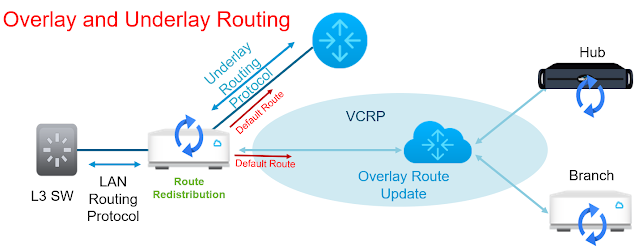
SD-WAN has a kind of Plug&Play strategy when it comes to connectivity and routing. Therefore automatically a default route is established on every working WAN-Interface and on every Overlay tunnel. Additionally there is an automatic bidirectional redistribution on every Edge between Underlay, LAN  and Overlay routes. From a networking point of view a kind of routing nightmare with Mutual Redistribution in both direction on every Edge. BUT by using an internal clever preferencing algorithm, routing loops and blackholes are mostly avoided. A SD WAN administrator can avoid pitfalls and wrong paths by following some basic rules:  Only enable Dynamic Routing when it is really necessary Never run a Dynamic Routing Protocol direct between Edges If Dynamic Routing is needed then there are some further rules to consider: Prevent Redistribution form Overlay to Underlay (it is not needed in most cases) Restrict Redistribution from Underlay to Overlay to Edges (Hub) who are playing...

All about the 4.x SD WAN Routing Behaviour Part 1: Overlay Flow Control (OFC), Distributed Cost Calculation (DCC) and Lost Reason Codes

Image
As already described in my Blog regarding  Lost OFC Routes  https://sd-wahn.blogspot.com/2022/01/where-have-all-ofc-routes-gone-or-my.html there were considerable routing behaviour changes starting with version 3.4.0 Excerpt from VMware SD-WAN Operator Guide Version 4.5 Configure Distributed Cost Calculation By default, the Orchestrator is actively involved in learning the dynamic routes. VMware SD-WAN Edges and Gateways rely on the Orchestrator to calculate initial route preferences and return them to the Edge and Gateway. The Distributed Cost Calculation feature enables you to distribute the route cost calculation to the Edges and Gateways. Note: Enabling Distributed Cost Calculation is recommended for all customers. This default method of involving the Orchestrator in both dynamic route calculation and the distribution of those routes to Edges and Gateways has drawbacks of significant higher route convergence time ...

Edges and Bandwidth and Performance Measurement: What you need to know about...

Image
Around 2 months ago when doing a Speedtest check of my links I experienced a substancial reduction of measured UPlink and DOWNlink speed. As I only have a single link to the Internet using Cable Modem connectivity which is a shared linktype, after some retries I assumed the problem to be at the Service Provider and some congestion there. I contacted the Service Provider but he assured me, that this is not the case. Then I found the real "culprit". It was my VMware SD WAN Edge which drastically reduced the bandwidth sent out via the Overlay. When checking the Edge I found out that the last measured Bandwidth was around 40/10 instead of 180/40 Mbps.   I was quite unsure about that measured  bandwidth and found out that according to this VMware knowledge base article ... ... on wired links the bandwidth test is only done when there is a Link Up event or after 7 days . So what seemed have happened was, that the last bandwidth measurement took place at a time, where due to s...